REVIEW · MOAB
Self Guided Audio Driving Tour in Arches National Park
Book on Viator →Operated by GuideAlong (GyPSy Guide) · Bookable on Viator
Arches National Park is the kind of place that makes you slow down. This self-guided audio driving tour uses your phone’s GPS so the best stories and directions play at the right spots as you move.
I like the way the tour focuses your time on key arches—think Double Arch and the Windows area—when you only have an hour or two. I also like the practical setup: download once, go offline, and use CarPlay or Android Auto so your drive stays simple.
One drawback to plan for: the National Park pass is not included, so you’ll still need to budget for Arches entry (per vehicle).
In This Review
- Key highlights worth planning around
- Getting Set Up for GPS Audio in Arches (Offline First)
- How 1–2 Hours of Self-Guided Driving Changes Your Arches Day
- Stop 1: Arches National Park Route, Geology Stories, and Big-Named Sights
- Double Arch: a quick payoff for your first serious stop
- The Windows: multiple arches in a small area
- Devil’s Garden Fins and Landscape Arch: Short Walk, Big Context, One Caution
- Landscape Arch: impressive span, and an important reality check
- Windows, Park Avenue, Courthouse Towers: Mixing Easy Walks With Scenic Stops
- Park Avenue viewpoint: paved and easy to manage
- Courthouse Towers: add an extra canyon descent if you want more
- Skyline Arch Late-Afternoon Plan: Let the Sun Do the Work
- Price and Value: What $19.99 Gets You (and What It Does Not)
- Who This Audio Driving Tour Is Best For
- Should You Book This Arches National Park Audio Driving Tour?
- FAQ
- Is the tour offered in English?
- How long does the Arches National Park driving tour take?
- What’s the group size limit for this tour price?
- Do I need to buy Arches National Park admission separately?
- Do I need internet service inside Arches?
- How does the audio know where to play during the drive?
- Where do I start and where does the tour end?
- Can I cancel and get a refund?
Key highlights worth planning around
- GPS location-based autoplay so you hear stories as you reach each viewpoint or trailhead
- Offline-friendly GuideAlong app with pre-download and no internet needed in the park
- Time-smart route options designed for short visits, with room to add more stops
- Close-range arch hits in the Windows area using easy walks
- Great photo timing tips like early morning colors and late-afternoon Skyline Arch light
Getting Set Up for GPS Audio in Arches (Offline First)
The whole experience runs through the GuideAlong app and your phone’s GPS. After you book, you’ll get an email and text with instructions that include a link to download the tour, plus a voucher code you redeem with your Apple or Google account.
Before you enter the park, download everything over Wi‑Fi or cellular data. One review nailed the big reality here: you often don’t have reliable service in the park, so this step matters more than it sounds.
To start, open the GuideAlong app and look in My Tours to find your downloaded tour. Location-based audio then plays automatically as you drive, based on where your phone thinks you are.
For listening, the audio can play through your car’s Apple CarPlay or Android Auto screen. The app map shows on your phone, and if you prefer, you can connect by Bluetooth so your stereo carries the commentary.
Bring a charger. A USB/C car charger helps keep sound and GPS stable, especially on a long drive where your battery might otherwise panic.
Finally, keep the support option in mind. The provider lists toll-free phone, chat, and email support, which can be useful if something doesn’t show up in the app.
Other Arches National Park tours we've reviewed in Moab



How 1–2 Hours of Self-Guided Driving Changes Your Arches Day
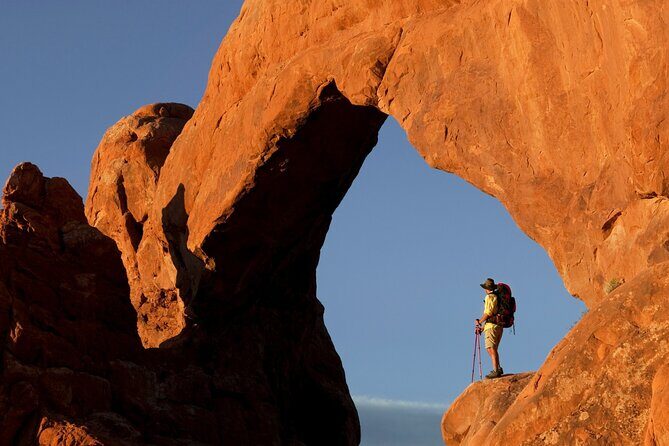
Arches can feel endless once you’re in the park. With 2,000+ arches out there, a classic problem is choice overload: you stop everywhere, then run out of time.
This tour solves that by letting you follow suggested routes or create your own order. Your audio plays based on your GPS position, so you’re not stuck with a rigid schedule—you’re building a route that fits how much walking you want.
In practice, this is a great setup for a stop-and-see day trip from Moab. You can keep it mostly driving with a couple of short walks, or you can add more trails if you’ve got legs and daylight.
Just remember that the timing depends on your comfort with the park. If you’re lingering at viewpoints, parking can take longer than you expect. The audio will still help you pick priorities, but you should plan on a relaxed pace if you want photos.
Stop 1: Arches National Park Route, Geology Stories, and Big-Named Sights
The tour starts inside Arches National Park, and the audio is designed to shape your route as you go. As the guide plays, it also gives an intro to the geological forces that made formations like The Windows possible—and the slow weather changes that keep reshaping the area.
You’ll also hear about people drawn to the park over time, plus notes on the fragile ecosystem. That matters because it adds context beyond the photos: these arches aren’t just scenery, they’re part of a living system, and the park’s thin soils and cracks are easy to damage.
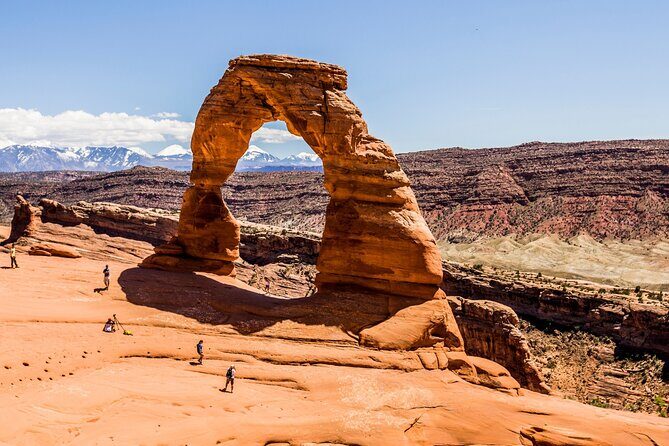
Because you can’t see everything in one go, the tour points you toward the best-known, must-spot features. Expect emphasis on highlights like Double Arch and Landscape Arch, plus options to extend into areas like Skyline Arch and Devils Garden if you have extra time.
Double Arch: a quick payoff for your first serious stop
Double Arch is one of those sights that instantly makes sense. You get dramatic structure without needing a long walk, which is ideal when your day is time-limited.
The tour’s role here is simple: it steers you toward the stop and frames what you’re looking at so you don’t just pass through a parking lot photo moment.
The Windows: multiple arches in a small area
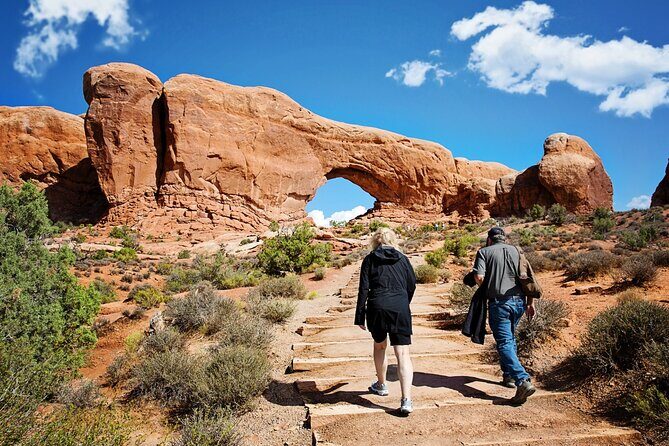
The Windows section is presented as a must-see, and the logic is clear. In a relatively compact area, you can see several arches with easy walks that fit well into a driving day.
This is also where the audio format shines. Because the commentary triggers by location, you don’t have to keep checking your phone for what’s next—you just move, listen, and follow the sequence.
Windows also works well if you like variety over distance. You get close to different arches and angles instead of one long hike that dominates the whole outing.
Other guided tours in Moab





Devil’s Garden Fins and Landscape Arch: Short Walk, Big Context, One Caution
Arches isn’t only famous for arch names—it’s famous for the way erosion carves rock into layers. That comes through in the way Devils Garden is described, including the idea of fins: narrow rock walls that erode over time into arches.
Devils Garden is a stronger pick if you enjoy the “how it formed” side of nature. It’s not just one photo; it’s a sense of process, with narrow sections and sculpted rock features that reward slow walking.
Landscape Arch: impressive span, and an important reality check
Landscape Arch is described as stretching 300+ feet (94 meters), with only about 11 feet (3.5 meters) at its center point. That thin middle is the dramatic moment.
But you should plan around a key detail: debris from a large fall in 1991 is visible, and the trail beneath the arch is closed. That changes your experience from a full under-arch stroll to an approach-and-look moment.
Even with the closure, you still get a meaningful walk that helps you understand scale. The trail begins at the Devils Garden trailhead and is about 1.6 miles (2.6 km) round trip, described as hard-packed with a few rolling hills.
For photos, the tour suggests early morning for best colors. If you’re doing this section, that’s a simple way to improve your results without adding hours to your day.
Windows, Park Avenue, Courthouse Towers: Mixing Easy Walks With Scenic Stops

This tour isn’t only about arches. It also nudges you toward canyon-style viewpoints that make the park feel like a place, not just a list.
Park Avenue viewpoint: paved and easy to manage
The Park Avenue area is described with an easy, paved trail to the Park Avenue viewpoint. That’s a smart inclusion if you want a quick stretch without turning the day into a long hike.
It’s also a classic Arches moment: tall rock walls create a street-like feeling, and the viewpoint gives you a “downtown skyline” comparison.
Courthouse Towers: add an extra canyon descent if you want more
From the Park Avenue viewpoint, you can continue another 1.6 km / 1 mile deeper into the canyon toward Courthouse Towers. This is still presented as doable, but it clearly adds effort.
This portion is where your audio helps you keep your bearings. You get just enough guidance to follow the next visual cue and decide if the deeper section is worth it for your energy level.
Skyline Arch Late-Afternoon Plan: Let the Sun Do the Work

If you’re flexible with timing, Skyline Arch is suggested for late afternoon. The tour frames it as a short, easy 1/2-mile trail, with spectacular photo results when the sun is low.
This is good advice for anyone who prefers fewer hours in daylight haze. Low-angle light tends to make rock texture pop, and a simple walk can look like a big adventure when the shadows hit right.
If your day is already packed, Skyline Arch can still work because it’s short. The main decision is whether you can wait a bit for the lighting payoff.
Price and Value: What $19.99 Gets You (and What It Does Not)
At $19.99 per group (up to 8 people), this is priced for vehicle-sized groups. That can be a good value when you’re traveling with friends or family in one car, because one purchase covers everyone in that vehicle.
The big thing to understand is what’s not included: Arches National Park admission tickets are separate. The info lists $35 per vehicle for 2024, with the amount varying by length of stay and factors like ages and group size, and you’ll want to confirm the current cost when you arrive.
So is it worth it? I think it usually is when you meet one of these situations:
- You have limited time and want help choosing what to see first.
- You don’t want to rely on cell service inside the park.
- You want context—geology, ecology, and stories—without paying for a timed guided tour.
The experience is also described as a one-time purchase with no expiry and free updates. That’s practical if your schedule shifts—you can reuse the download later.
Who This Audio Driving Tour Is Best For

This is a strong match if you want short walks tied to major sights, plus narration that follows you by GPS. It’s also ideal if you prefer steering your own day: start, stop, and resume at your leisure.
It’s less ideal if you want a live ranger or a fully escorted, behind-the-scenes explanation. This is an audio guide format, so you’re the one driving and deciding how much time each stop gets.
It also pays to be phone-ready. If your battery is low or the app doesn’t load correctly, you lose the thing you paid for. One negative experience in the feedback mentioned the tour not appearing where it should in the app, so I recommend you confirm in My Tours before you start driving.
Also separate the concept of tour purchase versus park entry. A separate complaint highlighted confusion when people expected park tickets to be part of the audio purchase. Don’t assume the voucher is the park pass.
Should You Book This Arches National Park Audio Driving Tour?
I’d book it if you’re doing Arches as a focused day trip and you want smart routing, GPS-triggered stories, and offline audio. The Windows and Double Arch emphasis fits short schedules, and the extra guidance around Park Avenue, Courthouse Towers, Devils Garden, and Skyline Arch gives you more options without turning the day into guesswork.
Skip it or think twice if you’re allergic to app setup or you hate planning around phone battery. In that case, the tour can feel like extra steps, and the park pass still needs separate purchase.
If you’re comfortable downloading ahead, charging your phone, and using GPS as your guide, this is a cost-effective way to get more meaning from the drive—without spending your whole day hiking.
FAQ
Is the tour offered in English?
Yes, the audio tour is offered in English.
How long does the Arches National Park driving tour take?
It’s listed as about 1 to 2 hours.
What’s the group size limit for this tour price?
The price is per group for up to 8 people in your vehicle.
Do I need to buy Arches National Park admission separately?
Yes. National Park Passes are not included. The info lists $35 per vehicle for 2024, and it can vary based on factors like stay length, ages, and group size.
Do I need internet service inside Arches?
No. You can download the tour so the audio and experience work offline.
How does the audio know where to play during the drive?
The commentary plays automatically based on your phone’s GPS location as you drive through the park.
Where do I start and where does the tour end?
It starts at Arches National Park, Utah, USA and ends back at the meeting point.
Can I cancel and get a refund?
Yes. Free cancellation is available up to 24 hours in advance for a full refund. Changes made less than 24 hours before the start time are not accepted, and cancellations within 24 hours are not refunded.